vertex / software index

Software

MacShot and SideScreen are free MIT-licensed Windows tools. Ghost Display is an Android experiment, not publicly released yet. Downloads do not require an account or email.

/software

Software

01 / macshot
PRINT SCREENcapture / drag / done
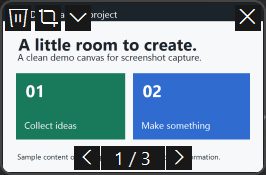
Actual MacShot floating thumbnail, with crop, recycle, dismiss and batch navigation controls
Actual app capture · sample content
  • Windows
  • Free / MIT
  • v0.4.0
  • Early release
  • Source available

MacShot

Mac-style screenshot thumbnails for Windows.

Press Print Screen, capture an area, and a thumbnail appears in the corner. Drag it into another app, crop it, dismiss it, or send the file to the Recycle Bin.

Tested mainly on Windows 11 x64. Unsigned prerelease. Mixed-DPI and HDR setups are not comprehensively tested.

Released

02 / sidescreen
WINDOWS / TWO WORKSPACES
you keep workingpassive preview
Workspace diagram · supported controls only
  • Windows
  • Free / MIT
  • v0.2.0
  • Early release
  • Source available

SideScreen

Another Windows display for agent windows.

Move an agent’s windows onto a virtual display and preview that display without sending it your mouse or keyboard input. Supported native controls can be operated in the background.

Requires a separately installed MTT virtual display and .NET Framework 4.8. Background input supports classic native controls, not arbitrary browser pages. This is not a separate Windows session.

Released

03 / ghost-display
ANDROID / ANOTHER DISPLAYpreview
Display concept · Shizuku-backed private preview
  • Android
  • Private preview
  • Private

Ghost Display

A second Android display inside your phone.

Ghost creates another Android display inside your phone. Real apps can run there. An agent can screenshot it, tap it, type into it and swipe while your physical display remains separate.

Requires Shizuku. This does not create a separate Android user. Not publicly released yet.